고정 헤더 영역
상세 컨텐츠
본문
리액트 하다보면 꽤나 자주 로딩 Spinner가 아쉽당.
코드 동작확인이야 대충 로딩중... 이란 메세지를 띄우면 되지만
사람인지라 곧 제대로 된 있어보이는 Spinner를 넣지 못한게
마음에 띰띰함을 남기고... 그저 반복되는 오디 괜찮은 거 없낭?
하는 당연한 아쉬움이 그렇게 스스로의 맘을 눅눅하게 만든당.
요때다 지금 상황이 그러하다면 아래 링크를 따라 가보장.
https://mhnpd.github.io/react-loader-spinner/
꽤나 따양하고 땀찍한 9개 Spinner가 시선을 잡아간다.
[실제는 훨씬 더 많이 제공되서 기쁘미당.]
그럼 바로 사용법을 눈에 확인 시켜 주어보장.
당연 폴더를 1개 만들공, vscode로 해당 폴더를 열공, 터미널에
npx create-vite@latest .
입력하고 선택은 react , javascript로 하공, 영문자 o도 미리 입력한다.
필요 없는 파일 정리 작업은 당신에게 맡긴당.(귀찮다면 할 수 없당)
Spinner 패키지를 아래 명령어로 설치하장.
npm i react-loader-spinner
App.jsx 를 아래 코드로 복사/붙여넣기 해보면 바로 사용법 인지당.
import { Audio, DNA, Grid, Hearts, ThreeCircles } from "react-loader-spinner";

function App() {

  return (
    <>
      <h1
        style={{
          textAlign: "center",
          backgroundColor: "black",
          color: "yellow",
        }}
      >
        MK 데뷔 추카 다양한 Spinner
      </h1>
      <Audio color="magenta" />
      <DNA />
      <ThreeCircles />
      <Discuss />
      <Hearts color="pink" />
      <Grid color="blue" />
      <Hourglass />
    </>
  );
}

export default App;
화면을 보고 나면 머얌 넘 쉽잖아 느끼미가 찾아온다.
요 타이밍에 아래 링크를 보면 사용법 익히기 완성이당.
https://mhnpd.github.io/react-loader-spinner/docs/intro
너무 쉬운 김에 쪼메 더 가보장.
위 패키지에서 제공되는 Spinner의 종류가 많은데 한개만 골라서 쓰기에는
맘이 아까우니, 그저 제공되는 것 중에 랜덤하게 나온다면 훨씬 재밌지 않을까?
그래서 만들어 보았다.
spinAttrs.js 는 제공되는 모든 Spinner의 디폴트 속성값을 담고 있는 파일이당.
[ 잔머리를 조금 써서 짐작하는 것 보다는 쉽게 만들었다. 일단 필요하당 ]
export const spinAttrs = {
  Audio: {
    height: 100,
    width: 100,
    color: "#4fa94d",
    ariaLabel: "audio-loading",
    wrapperStyle: {},
    wrapperClass: "",
    visible: true,
  },
  BallTriangle: {
    height: 100,
    width: 100,
    radius: 5,
    color: "#4fa94d",
    ariaLabel: "ball-triangle-loading",
    wrapperClass: "",
    wrapperStyle: {},
    visible: true,
  },
  Bars: {
    height: 80,
    width: 80,
    color: "#4fa94d",
    ariaLabel: "bars-loading",
    wrapperStyle: {},
    wrapperClass: "",
    visible: true,
  },
  Blocks: {
    visible: true,
    width: 80,
    height: 80,
    wrapperClass: "",
    wrapperStyle: {},
    ariaLabel: "blocks-loading",
  },
  Circles: {
    height: 80,
    width: 80,
    color: "#4fa94d",
    colors: ["#4fa94d"],
    gradientType: "",
    gradientAngle: 0,
    ariaLabel: "circles-loading",
    wrapperStyle: {},
    wrapperClass: "",
    visible: true,
  },
  CirclesWithBar: {
    wrapperStyle: {},
    visible: true,
    wrapperClass: "",
    height: 100,
    width: 100,
    color: "#4fa94d",
    outerCircleColor: "#4fa94d",
    innerCircleColor: "#4fa94d",
    barColor: "#4fa94d",
    ariaLabel: "circles-with-bar-loading",
  },
  CircularProgress: {
    height: 100,
    width: 100,
    color: "#4fa94d",
    secondaryColor: "#4fa94d",
    ariaLabel: "circular-progress-loading",
    wrapperStyle: {},
    wrapperClass: "",
    visible: true,
    strokeWidth: 2,
    animationDuration: 1,
  },
  ColorRing: {
    visible: true,
    width: 80,
    height: 80,
    colors: ["#e15b64", "#f47e60", "#f8b26a", "#abbd81", "#849b87"],
    wrapperClass: "",
    wrapperStyle: {},
    ariaLabel: "color-ring-loading",
  },
  Comment: {
    visible: true,
    width: 80,
    height: 80,
    backgroundColor: "#ff6d00",
    color: "#fff",
    wrapperClass: "",
    wrapperStyle: {},
    ariaLabel: "comment-loading",
  },
  DNA: {
    visible: true,
    width: 80,
    height: 80,
    wrapperClass: "",
    wrapperStyle: {},
    ariaLabel: "dna-loading",
    dnaColorOne: "rgba(233, 12, 89, 0.51)",
  },
  Discuss: {
    visible: true,
    width: 80,
    height: 80,
    wrapperClass: "",
    wrapperStyle: {},
    ariaLabel: "discuss-loading",
    colors: ["#ff727d", "#ff727d"],
  },
  FallingLines: {
    color: "#4fa94d",
    width: 100,
    visible: true,
  },
  FidgetSpinner: {
    width: 80,
    height: 80,
    backgroundColor: "#4fa94d",
    ballColors: ["#fc636b", "#6a67ce", "#ffb900"],
    wrapperClass: "",
    wrapperStyle: {},
    ariaLabel: "fidget-spinner-loader",
    visible: true,
  },
  Grid: {
    height: 80,
    width: 80,
    radius: 12.5,
    color: "#4fa94d",
    ariaLabel: "grid-loading",
    wrapperStyle: {},
    wrapperClass: "",
    visible: true,
  },
  Hearts: {
    height: 80,
    width: 80,
    color: "#4fa94d",
    ariaLabel: "hearts-loading",
    wrapperStyle: {},
    wrapperClass: "",
    visible: true,
  },
  Hourglass: {
    visible: true,
    width: 80,
    height: 80,
    wrapperClass: "",
    wrapperStyle: {},
    ariaLabel: "hourglass-loading",
    colors: ["#306cce", "#72a1ed"],
  },
  InfinitySpin: {
    color: "#4fa94d",
    width: 200,
  },
  LineWave: {
    wrapperStyle: {},
    visible: true,
    wrapperClass: "",
    height: 100,
    width: 100,
    color: "#4fa94d",
    ariaLabel: "line-wave-loading",
    firstLineColor: "#4fa94d",
    middleLineColor: "#4fa94d",
    lastLineColor: "#4fa94d",
  },
  MagnifyingGlass: {
    visible: true,
    height: 80,
    width: 80,
    wrapperClass: "",
    wrapperStyle: {},
    ariaLabel: "magnifying-glass-loading",
    glassColor: "#c0efff",
    color: "#e15b64",
  },
  MutatingDots: {
    height: 90,
    width: 80,
    radius: 12.5,
    color: "#4fa94d",
    secondaryColor: "#4fa94d",
    ariaLabel: "mutating-dots-loading",
    wrapperStyle: {},
    wrapperClass: "",
    visible: true,
  },
  Oval: {
    height: 80,
    width: 80,
    color: "#4fa94d",
    secondaryColor: "#4fa94d",
    ariaLabel: "oval-loading",
    wrapperStyle: {},
    wrapperClass: "",
    visible: true,
    strokeWidth: 2,
    strokeWidthSecondary: 2,
    animationDuration: 1,
  },
  ProgressBar: {
    visible: true,
    height: 80,
    width: 80,
    wrapperClass: "",
    wrapperStyle: {},
    ariaLabel: "progress-bar-loading",
    borderColor: "#F4442E",
    barColor: "#51E5FF",
  },
  Puff: {
    height: 80,
    width: 80,
    radius: 1,
    color: "#4fa94d",
    ariaLabel: "puff-loading",
    wrapperStyle: {},
    wrapperClass: "",
    visible: true,
  },
  Radio: {
    visible: true,
    height: 80,
    width: 80,
    wrapperClass: "",
    wrapperStyle: {},
    ariaLabel: "radio-loading",
    colors: ["#1B5299", "#EF8354", "#DB5461"],
  },
  RevolvingDot: {
    radius: 45,
    strokeWidth: 5,
    color: "#4fa94d",
    secondaryColor: "r2",
    ariaLabel: "revolving-dot-loading",
    wrapperStyle: {},
    wrapperClass: "",
    visible: true,
  },
  Rings: {
    height: 80,
    width: 80,
    radius: 6,
    color: "#4fa94d",
    ariaLabel: "rings-loading",
    wrapperStyle: {},
    wrapperClass: "",
    visible: true,
  },
  RotatingLines: {
    height: 96,
    width: 96,
    color: "#4fa94d",
    strokeWidth: 5,
    animationDuration: 0.75,
    strokeColor: "#4fa94d",
    visible: true,
    ariaLabel: "rotating-lines-loading",
    wrapperStyle: {},
    wrapperClass: "",
  },
  RotatingSquare: {
    wrapperClass: "",
    color: "#4fa94d",
    height: 100,
    width: 100,
    strokeWidth: 4,
    ariaLabel: "rotating-square-loading",
    wrapperStyle: {},
    visible: true,
  },
  RotatingTriangles: {
    visible: true,
    height: 80,
    width: 80,
    wrapperClass: "",
    wrapperStyle: {},
    ariaLabel: "rotating-triangle-loading",
    colors: ["#1B5299", "#EF8354", "#DB5461"],
  },
  TailSpin: {
    height: 80,
    width: 80,
    strokeWidth: 2,
    radius: 1,
    color: "#4fa94d",
    ariaLabel: "tail-spin-loading",
    wrapperStyle: {},
    wrapperClass: "",
    visible: true,
  },
  ThreeCircles: {
    wrapperStyle: {},
    visible: true,
    wrapperClass: "",
    height: 100,
    width: 100,
    color: "#4fa94d",
    ariaLabel: "three-circles-loading",
    outerCircleColor: "#4fa94d",
    innerCircleColor: "#4fa94d",
    middleCircleColor: "#4fa94d",
  },
  ThreeDots: {
    height: 80,
    width: 80,
    radius: 9,
    color: "#4fa94d",
    ariaLabel: "three-dots-loading",
    wrapperStyle: {},
    wrapperClass: "",
    visible: true,
  },
  Triangle: {
    height: 80,
    width: 80,
    color: "#4fa94d",
    ariaLabel: "triangle-loading",
    wrapperStyle: {},
    wrapperClass: "",
    visible: true,
  },
  Vortex: {
    visible: true,
    height: 80,
    width: 80,
    ariaLabel: "vortex-loading",
    wrapperStyle: {},
    wrapperClass: "",
    colors: ["#1B5299", "#EF8354", "#DB5461", "#1B5299", "#EF8354", "#DB5461"],
  },
  Watch: {
    height: 80,
    width: 80,
    radius: 48,
    color: "#4fa94d",
    ariaLabel: "watch-loading",
    wrapperStyle: {},
    wrapperClass: "",
    visible: true,
  },
};
RanSpinner.jsx 파일 요게 핵심 파일이당.
import * as Spinners from "react-loader-spinner";
import { spinAttrs } from "./spinAttrs";

/*
console.log("좋은 습관 체킁: ",
  Spinners.Audio.toString().substring(1, Spinners.Audio.toString().indexOf(")"))
);

//지원되는 Spinner 이름을 출력하기 위한 코드, key값을 확인하고자 함
let fullString = "{";
Object.keys(Spinners).forEach((key) => {
  fullString += `"${key}":${Spinners[key]
    .toString()
    .substring(1, Spinners[key].toString().indexOf(")"))},`;
});
fullString += "}";
console.log(fullString);
*/


function RanSpinner({ width = 80, height = 80 }) {
  // 이게 곧 함수
  const spinName = rName();
  const SpinnerComp = Spinners[spinName];
  const attrs = spinAttrs[spinName];

  if (attrs.width) attrs.width = width;
  if (attrs.height) attrs.width = height;
  attrsColor(attrs);

  if (SpinnerComp) {
    return <SpinnerComp {...attrs} />; // 함수 호출
  }

  // 이건 그냥 참공 <DNA {...attrs} /> 와 동일한 호출
  return <Spinners.DNA />;
}

// 제공되는 Spinner 이름
const sNames = [
  "Audio",
  "BallTriangle",
  "Bars",
  "Blocks",
  "Circles",
  "CirclesWithBar",
  "CircularProgress",
  "ColorRing",
  "Comment",
  "DNA",
  "Discuss",
  "FallingLines",
  "FidgetSpinner",
  "Grid",
  "Hearts",
  "Hourglass",
  "InfinitySpin",
  "LineWave",
  "MagnifyingGlass",
  "MutatingDots",
  "Oval",
  "ProgressBar",
  "Puff",
  "Radio",
  "RevolvingDot",
  "Rings",
  "RotatingLines",
  "RotatingSquare",
  "RotatingTriangles",
  "TailSpin",
  "ThreeCircles",
  "ThreeDots",
  "Triangle",
  "Vortex",
  "Watch",
];

// 랜덤 Spinner 선택
const rName = () => {
  return sNames[Math.floor(Math.random() * sNames.length)];
};

// 랜덤 16진수 칼라
const rHexColor = () => {
  let hex = ((Math.random() * 0x1000000) | 0).toString(16);
  return "#" + hex.padEnd(6, "0");
};

// color관련 속성 모두 random 칼러롱
const colorKeys = [
  "color", "secondaryColor", "outerCircleColor",
  "innerCircleColor", "middleCircleColor", "barColor",
  "backgroundColor", "firstLineColor", "middleLineColor",
  "lastLineColor", "glassColor", "strokeColor"
];

const attrsColor = (attrs) => {
  colorKeys.forEach(key => {
    if (attrs[key]) {
      if (key == "ballColors" || key == "colors")
        attrs[key] = [rHexColor(), rHexColor(), rHexColor(), rHexColor(), rHexColor(), rHexColor()];
      else attrs[key] = rHexColor();
    }
  })

}

export default RanSpinner;
App.jsx 를 아래 처럼 고치면 화면을 새로고침 할때 마다 랜덤 확인이 된당.
import RanSpinner from "./RanSpinner";

function App() {

  return (
    <>
      <h1 style={h1Style} >
        MK 데뷔 추카 다양한 Spinner
      </h1>
      <RanSpinner width={100} height={100} />
      <RanSpinner />
      <RanSpinner width={100} height={100} />
    </>
  );
}

// H1 스타일
const h1Style = {
  textAlign: "center",
  backgroundColor: "black",
  color: "yellow",
  borderRadius: 12
}
export default App;
결과를 확인했다면 알겠지만, RanSpinner.jsx 소스에는 width와 height는
Props로 넘겨 받을 수 있도록 했고 만약 설정하지 않았다면
defalut로 80, 80 값을 가지도록 하였당.
추가적으로 재밌게 하기 위해 color를 지정하는 속성에는 모두 랜덤 값을 넣었다.
RanSpinner.jsx 가 훔쳐가야 할 유일한 소스당.
이제 덤으로 실제 더미 데이터와 AJAX 페이크 코드를 살짝 넣어서
진실로 Spinner로 동작하는 모습을 확인하는 시간을 가지자.
fake.js
// 그냥 가짜 데이터
const data = [
  { id: 1, name: "시현", feature: "다이어트" },
  { id: 2, name: "혜선", feature: "딴소리" },
  { id: 3, name: "민경", feature: "기침감기" },
  { id: 4, name: "승아", feature: "목소리" },
  { id: 5, name: "예원", feature: "패션츄리닝" },
  { id: 6, name: "경민", feature: "말괄량이" },
  { id: 7, name: "선주", feature: "이모티콘" },
  { id: 8, name: "윤정", feature: "황금구두" },
  { id: 9, name: "현정", feature: "댄스머신" },
  { id: 10, name: "이서", feature: "이태원천재" },
  { id: 11, name: "조이", feature: "동물농장" },
  { id: 12, name: "진영", feature: "잘가라아" }
];

// AJAX Fake
export const getData = async () => {
  return new Promise((resolve) => {
    const ranTime = Math.round(Math.random() * 2000) + 1000;
    setTimeout(() => {
      const newData = [...data];
      Array.from({ length: 8 }).forEach(() => {
        newData.splice(Math.floor(Math.random() * newData.length), 1);
      })
      resolve(newData);
    }, ranTime);
  });
};
Hero.jsx 는 Spinner 이후에 화면엥 나올 UI 컴포넌트
const avar = "https://api.dicebear.com/9.x/big-smile/svg?seed=";
function Hero({ name, feature }) {
  return (
    <div style={flexColStyle}>
      <img width={100} height={100} src={`${avar}${name}`} alt={name} />
      <h3 style={nameStyle}>{name}</h3>
      <h4 style={featureStyle}>{feature}</h4>
    </div>
  )
}

// 그냥 스타일
const flexColStyle = {
  display: "inline-flex",
  flexDirection: "column",
  justifyContent: "center",
  alignItems: "center"
}

const nameStyle = {
  color: "yellowgreen",
  backgroundColor: "black",
  width: "80%",
  textAlign: "center",
  borderRadius: 10,
}

const featureStyle = {
  borderBottom: `2px solid magenta`,
  color: "blue",
  width: "80%",
  textAlign: "center",
  fontWeight: "bolder"
}


export default Hero
App.jsx
import { useEffect, useState } from "react";
import { getData } from "./fake";
import RanSpinner from "./RanSpinner";
import Hero from "./Hero";

function App() {
  const [heros, setHeros] = useState([]);
  const [again, setAgain] = useState(true);

  useEffect(() => {
    if (!again) setHeros([]);
    else {
      getData().then((result) => {
        //console.log("result", result);
        setHeros([...result]);
      });
    }

    const timerId = setTimeout(() => {
      setAgain(!again)
    }, 5000);

    return () => {
      //console.log("unmount");
      clearTimeout(timerId);
    }
  }, [again]);

  return (
    <>
      <h1 style={h1Style} >
        MK 데뷔 추카 다양한 Spinner
      </h1>
      {heros.length ? (
        <div style={flexStyle}>
          {heros.map((hero) => (
            <Hero key={hero.id} {...hero} />
          ))
          }
        </div>
      ) : (
        <div style={flexStyle}>
          <RanSpinner width={100} height={100} />
          <RanSpinner width={100} height={100} />
          <RanSpinner width={100} height={100} />
          <RanSpinner width={100} height={100} />
        </div>
      )}
    </>
  );
}

// H1 스타일
const h1Style = {
  textAlign: "center",
  backgroundColor: "black",
  color: "yellow",
  borderRadius: 12
}
// flex 스타일
const flexStyle = {
  display: "flex",
  justifyContent: "space-evenly",
  alignItems: "center"
}

export default App;
데이터 오기 전 Spinner 동작 화면
[ 똑같은 Spinner가 나오는 지루함에서 벗어나게 되었당.. ㅋㅋ]

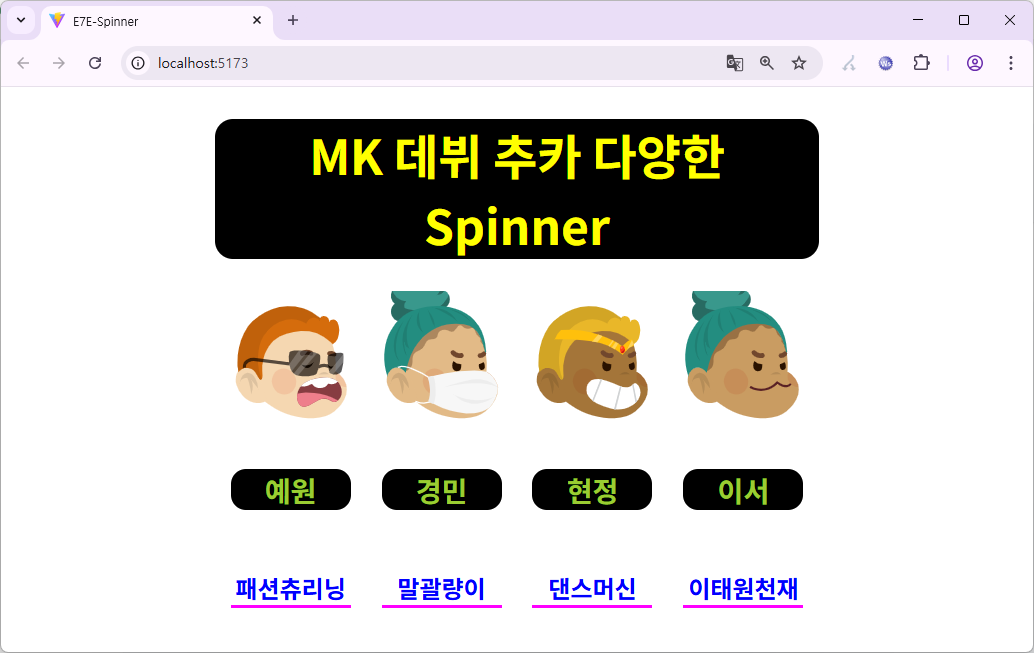
Data가 도착하면 Spinner는 사라지고, 데이터가 보인당.
[ 랜덤데이터 중 랜덤으로 4개만 나오게 했으닝, 어쩌면 이름에 불만이 있을수도...]
노파심에 전체 소스를 아래 zip 파일로 올린당.
[ npm i 가 필요함을 잊지말장 ]
사용은 간단하지만, 만약 시간이 있어 소스를 여유롭게 본다면, 결단코
그 누군가는 전두엽의 자극으로 산문 코딩을 시 코딩으로 바꿀 테크닉을 얻으리랑.
한때 김다미가 조이서로 출연하여 맘껏 좋아햇던
빛 발랄 드라마 이태원 클라스
거기서 만났던 감정의 이음새들을 흔들었던 말
네가 너인 걸 다른 사람에게 납득시킬 필요는 없다.
그 와중에 청개구리 내 유전자일까
인정하고 싶지 않은 지능의 승부욕일까
감동 자극이지만 주제와 상황에 따라 뭐래?가 될 수 있다
띤실은 이렇다. 인생도 결과가 보이기 전
도전하고 방황하고 다시 도전하는 뱅뱅도는
그런 Spinner가 더 아기자기하고 예쁠 수 있다는 거당.
그저 감정 에너지 소비가 무작위적이라 기억하지 못할 뿐...
내가 나 인걸 친구 하고픈 너에게
납득 시키고 픈 건 나만의 Spinner를
너에게만 보여주고 싶은 맘의 뱅뱅이당.
뱅뱅 스피너! 우린 그냥 친구뿐일까?
넌 그냥 계속 그렇게 돌기만 할거징!!
https://www.youtube.com/watch?v=KceYK_5TY18
'React' 카테고리의 다른 글
| React(리액트) 티키타카 39 커스텀 훅(Custom Hook) (0) | 2026.01.19 |
|---|---|
| React(리액트) 티키타카 38 (19버젼에 추가된 form action) (6) | 2025.12.26 |
| React(리액트) 티키타카 18 ( rc-tree 트리 컴포넌트) (2) | 2025.11.04 |
| React(리액트) 티키타카 33 SVAR Gantt(업그레이드) (3) | 2025.11.03 |
| React With TypeScript 체킁1 (2) | 2025.10.21 |


