고정 헤더 영역
상세 컨텐츠
본문
미쳐 몰랐다. 귀차니즘에 근거한 외면에 뿌리를 둔 나의 불찰이당.
jsp(thymeleaf도)의 security 설정과 react jwt security 설정을
합쳐서 만들어 내는 걸 당연히 꽤나 많이 힘들어 한다는 걸!
그냥 security도 애매모호 한데, jwt까지 붙이라닝 아마도 힘들었으리라.
사실 요즘 같은 A.I 시대엔 정확히 원하는 대로 동작하는 코드는
아니더라도, 질문을 잘 하면 꽤나 괜찮은 힌트들을 얻을 수 있고,
거기서 잘 시작하면 원하는 결과에 도달하는 재미난 여정을 즐길 수 있다.
[ 단 기초 개념이 잘 잡혀있는 경우에 그렇다.
기초 개념이 잘 잡혀있지 않으면 때려 맞춘 결과가 소멸하는 일시적 흥분을 준다]
아래 글은 일반적인 JSP를 사용하는 경우의 Spring Security를 담고 있고
2024.03.11 - [스프링] - spring boot 3 security 그냥 한번 해보고 한번 더 해보면 잘 될꺼얼!
아래 글은 JWT를 사용해야 하는 경우의 Spring Security를 담고 있다
2025.01.07 - [스프링부트] - spring boot3 security jwt 적용 1 (B/E)
곧 프론트 프레임워크를 사용하는 경우에 필요하당. (물론 JWK란걸 활용해도 된당)
2개의 글을 모두 읽은 사람은 당연히 알것이다.
DB뿐만 아니라, 거의 대부분의 구성(인프라)가 같거나 비슷하다는 걸.
[ 후회스런 부분은 어린 악동의 마음으로 살짝 비튼 곳이 존재한당.. 암튼 그렇당]
2개를 교묘히 합치는 방법이 존재하는데, 그것은 멀티 securiyFilterChain 설정이당.
아래 소스를 잠깐 보장. (핵심 파트만 먼저 보장)
SecurityConfig.java
//.... 생략

@Slf4j
@Configuration
@EnableWebSecurity(debug = false)
@EnableMethodSecurity  						// @preAuthorize/@postAuthorize 사용
public class SecurityConfig {

@Autowired
	private DataSource dataSource; // application.properties에 설정한 spring.datasource D.I

	@Order(1)  // 순서가 중요하다. 범위가 작은 걸 먼저 설정해야 한당.
	@Bean
	SecurityFilterChain filterChain2(HttpSecurity http) throws Exception {
		log.debug("JWT 시큐리티 설정");

		http.securityMatcher("/rct/**")
		    .csrf(csrf->csrf.disable())
		    .cors(cors -> cors.configurationSource(corsConfigurationSource()))
		    .sessionManagement(sess -> sess.sessionCreationPolicy(SessionCreationPolicy.STATELESS))
		    .authorizeHttpRequests(auth -> auth.requestMatchers("/rct/e7e").hasRole("CEO")
		    		                           .requestMatchers("/rct/login").permitAll()
		    		                           .requestMatchers("/rct/refresh").permitAll()
		    		                           .anyRequest().authenticated())
			.formLogin(form-> form.loginPage("/rct/login")
					              .successHandler(jwtLoginSuccessHandler())
					              .failureHandler(jwtLoginFailureHandler()))
			.exceptionHandling(ex -> ex.accessDeniedHandler(jwtAccessDeniedHandler()));

		http.addFilterBefore(new JwtAuthenticationFilter(),UsernamePasswordAuthenticationFilter.class);

		return http.build();
	}

	@Order(2)
	@Bean
	protected SecurityFilterChain filterChain(HttpSecurity http) throws Exception {
		log.debug("JSP 시큐리티 설정");
		return http.httpBasic(hbasic -> hbasic.disable())
				.headers(config -> config.frameOptions(customizer -> customizer.sameOrigin()))
				.authorizeHttpRequests(
						authz -> authz.dispatcherTypeMatchers(DispatcherType.FORWARD, DispatcherType.ASYNC).permitAll() // forward 허가
								.requestMatchers("/","/login", "/error").permitAll()
								.requestMatchers("/css/**", "/js/**", "/img/**", "/favicon.ico").permitAll()
								.requestMatchers("/ceo/**").hasRole("CEO")
								.requestMatchers("/manager/**").hasAnyRole("CEO","MANAGER")
								.anyRequest().authenticated())
				.formLogin(form -> form.loginPage("/login")
						               .successHandler(customLoginSuccessHandler())
						               .failureHandler(customLoginFailureHandler()))
				.sessionManagement(session -> session.maximumSessions(1))
				.exceptionHandling(ex -> ex.accessDeniedHandler(customAccessDeniedHandler()))
				.logout(Customizer.withDefaults()).rememberMe(config -> config.key("e7eKey").tokenValiditySeconds(86400)
						.tokenRepository(persistentTokenRepository()))
				.build();
	}

  // .... 생략
}
2개의 SecurityFilterChain을 리턴하는 메소드가 존재하고,
@Order(1) 어노테이션이 붙은 게 React용이고,
@Order(2) 가 붙은 게 JSP용이당.
[ 사실 이게 전체 구성 핵심이당 ]
주석을 달아놓긴 했는데,
Order 넘버가 중요한데, 숫자가 작은 것에 동작 범위가 작은 것을 지정해야 한당.
나의 경우 react에서 사용할 url, 곧 jwt를 쓸 거는 모두 url 에 /rct를
붙이도록 하여, 첫번째 SecurityFilterChain이 동작하도록 (결국 /rct/** 에만 동작),
그 외의 경우는 두번째 SecurityFilterChain이 동작하도록 하였당.
그리고 소스를 보면 알겠지만, 각각의 로그인 successHandler, failureHandler,
accessDeniedHandler는 처리 방식이 달라야 해서 따로 클래스 파일을 분리하였다.
나머지 부분은 2개의 글 모두 읽은 사람에게는 그저 코드를 확인하는
시간만 의미를 가지므로 동작 확인한 코드를 아래 첨부 한당.
[ DB는 준비가 되어 있어야 동작확인이 가능함을 잊지 말장 ]
다운 받아서 동작 시키면,
2024.03.11 - [스프링] - spring boot 3 security 그냥 한번 해보고 한번 더 해보면 잘 될꺼얼!
글에서 되던 동작과
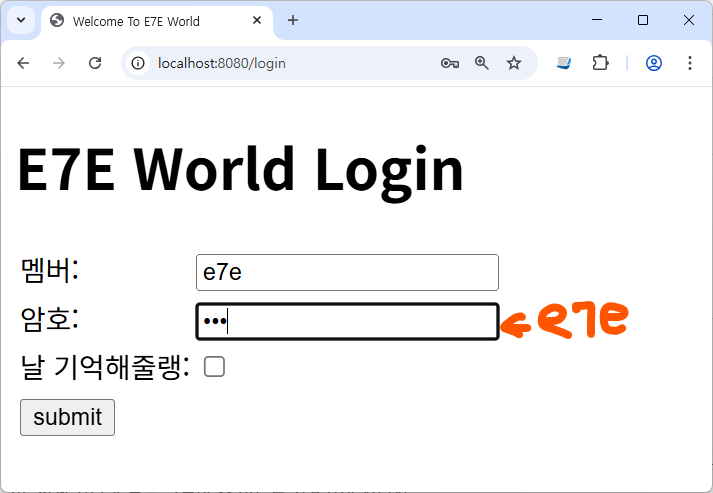

심지어 암호도 보이게 해놓았당. 알아낼 수 있을까?~~ ㅋㅋ
2025.01.07 - [스프링부트] - spring boot3 security jwt 적용 1 (B/E)
글에서 되던 동작도 postman이나 boomerang을 이용하면 잘 동작됨이 확인된당.
하지만 누군가는 많이 아쉬워 할지도 모른다는 불안감이 순간 개큰공으로 온다.
JWT 로그인만 확인할 수 있게 초우 간단 React를 할 수없이 만들어보장.
vscode의 Open Foler로 새폴더를 만들어 열고, 터미널을 열어 아래 명령어를 치장
npx create-vite@latest .
npm i axios sweetalert2 sweetalert2-react-content
sweetalert2는 그냥 재미로 넣었어용
초 간단이긴 하지만 너무 못생기면 그러하니 아래처럼 혼을 갈아넣은 css
index.css
#root {
    width: 450px;
    margin:30px auto;
    border:10px solid pink;
    border-radius: 10px;
    text-align: center;
    padding-bottom: 20px;
}

h1 {
     background-color: black;
     color:yellowgreen;
}

h3 {
     color:goldenrod;
}

h4 {
    color: rgb(197, 5, 133);
}

h4 > div {
    color:rgb(5, 90, 97);
}

#memId {
    display: inline;
    color:blue;
}

span {
    display: inline-block;
    width: 50px;
    text-align: center;
    font-weight: bolder;
    color: cadetblue;
}

button {
    margin-top: 20px;
    font-size: 1.2em;
    border-radius: 3px;
    border: transparent;
    background-color: blueviolet;
    color:white;
}
LoginForm.jsx 는 간단한 로그인 form으로 jwt받아서 localStorage에 저장했쪄
import axios from "axios";
import { useRef } from "react";
import Swal from "sweetalert2";
import withReactContent from "sweetalert2-react-content";

const rctURL = "http://localhost:8080/rct";

function LoginForm({ setIsLogin }) {
  const mkForm = useRef(null);

  const handleSubmit = (e) => {
    e.preventDefault();

    axios
      .post(`${rctURL}/login`, null, {
        params: {
          username: mkForm.current.username.value,
          password: mkForm.current.password.value,
        },
      })
      .then((rslt) => {
        console.log(rslt.data);
        if (!rslt.data.Error) {
          localStorage.setItem("loginInfo", JSON.stringify(rslt.data));
          setIsLogin(true);
        } else {
          withReactContent(Swal).fire("머냥 아이디? 암호? 아님 둘다");
          mkForm.current.username.focus();
        }
      });
  };

  return (
    <>
      <h4>단순 로그인 체크만 테스트</h4>
      <div style={{ display: "flex", justifyContent: "center" }}>
        <form ref={mkForm} onSubmit={handleSubmit}>
          <div>
            <span>아 디</span>
            <input type="text" name="username" autoFocus defaultValue={"e7e"} />
          </div>
          <div>
            <span>암 호</span>
            <input type="password" name="password" defaultValue={"e7e"} />
          </div>
          <div>
            <button>로그잉</button>
          </div>
        </form>
      </div>
    </>
  );
}

export default LoginForm;
Profile.jsx 는 로그인 성공하면 localStorage 정보 읽어 사용자 정보 뿌리는 애
import { useEffect, useState } from "react";

function Profile({ setIsLogin }) {
  const [userInfo, setUserInfo] = useState(null);

  useEffect(() => {
    const loginInfo = JSON.parse(localStorage.getItem("loginInfo"));
    console.log("체킁:", loginInfo);
    setUserInfo(loginInfo);
  }, []);

  const handleClick = () => {
    if (localStorage.getItem("loginInfo")) {
      localStorage.removeItem("loginInfo");
      setIsLogin(false);
    }
  };

  return (
    <>
      {userInfo ? (
        <div>
          <h3>
            <span id="memId">{userInfo.memName}</span> 님의 프로필
          </h3>
          <img
            width={150}
            height={150}
            src={`https://api.dicebear.com/9.x/avataaars/svg?seed=${userInfo.memName}`}
          />
          <h4>
            권한은:
            <br />
            {userInfo.authList.map((auth) => (
              <div key={auth.authName}>{auth.authName}</div>
            ))}
          </h4>
        </div>
      ) : null}
      <button onClick={handleClick}>로그아웃</button>
    </>
  );
}

export default Profile;
App.jsx 에 2개를 넣어요 isLogin 상태 변수로 둘 중에 누가 화면에 등장할지?
import { useState } from "react";
import LoginForm from "./LoginForm";
import Profile from "./Profile";

function App() {
  const [isLogin, setIsLogin] = useState(false);

  return (
    <>
      <h1>MK JWT사용</h1>
      {!isLogin ? (
        <LoginForm setIsLogin={setIsLogin} />
      ) : (
        <Profile setIsLogin={setIsLogin} />
      )}
    </>
  );
}

export default App;
실행 결과는 아래와 같을지어다.

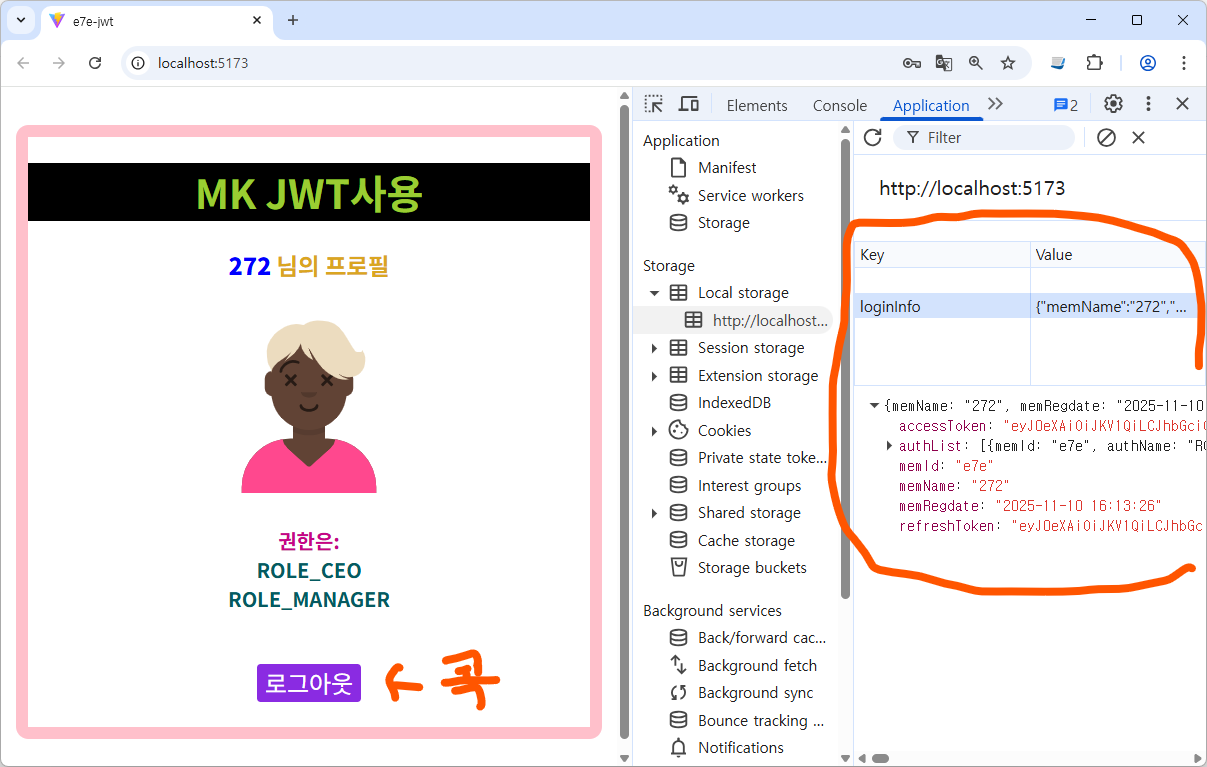
css에 잠시 시간을 투자하닝.. 그래도 그나마 낫당.
소스만 바라는 사람도 있당. 당근 초간단이라 MIT 라이센스당.
참고로 JWT( JSON Web Token) 도 있고 JWK( JSON Web Key, private/public 비대칭 키)
있으며, token을 브라우져 저장공간(localStorage등)에 저장해서 쓰는 방식
그냥 변수에 저장해서(in-memory) 사용하는 방식, Back-End 단에서
Cookie에 담아서 보내는 방식등 이 역시도 다양하당.(그냥 그렇당)
모든 걸 구지 다 알려고 할 필요는 없다. 개념만 잘 잡고 사용하면 그냥 훌륭하당.
아주 그리 마니 오래 오래 전 두 아이가 있었다.
천재라 불리며 칭찬의 비행기를 타고 세상의 집요한 감시를 받으며
세상이 준비한 그 길을 마냥 생각없이 시키는 대로 따라간 아이
멍청이라 불리며 잔혹한 내팽기침에 세상이 외면한 자유를 얻어
어이없이 세상에 없는 그 길을 개척하며 자신을 키워나간 아이
지금 한 어른은 어처구니 없이 흐늘리는 예쁜 단풍 뒤의
푸르스름 어스름 노을에 왠지 다리가 풀린당.
지금 또 한 어른은 어찌그리 힘차게 어딘가로 걸어간당.
뒷모습은 왜그리도 당당하고 아름다움을 흘릴까
둘 중 누군가에게 자유를 달라 해 본다.
여기 자~~유!
내가 그리도 찾아 헤매던 50cm 바로 그 자!
직선으로 갈 수 있는 자유가 내게로 와버렸다.
정작 문제는 ... 언제 어떻게 왜 어디서 자유?
https://www.youtube.com/watch?v=Ux_Vjw3AFGw
'스프링' 카테고리의 다른 글
| MyBatis에서 Oracle Procedure 그냥 불러 보기.... (6) | 2025.08.17 |
|---|---|
| NGROK 무료 static 도메인 (기쁨) (2) | 2024.08.23 |
| boot Thymeleaf(타임리프) 사용 (2) | 2024.04.20 |
| Faker 이용 가짜 데이터 맹글기 (0) | 2024.04.10 |
| spring boot 3 security 그냥 한번 해보고 한번 더 해보면 잘 될꺼얼! (2) | 2024.03.19 |


